ACCESS @ Cerritos - Easy Structure

How we organize information matters. Clear headings, well-structured lists, and accessible tables make course content easier for students to scan, understand, and navigate. They also provide important structure for students who use screen readers and other assistive technologies. When we use Canvas’s formatting intentionally, rather than simply changing the way text looks, we give students a clearer roadmap for understanding the content.
Easy Structure is about creating content that has a clear flow and makes sense at a glance. A student should be able to look at a page and quickly understand what they are looking at, how the information is organized, and where to find what they need. These practices can make our courses easier to use for everyone, while also improving their accessibility.
UDOIT Reminder: We’re working together toward 90% UDOIT accessibility in all Canvas courses by the end of Fall 2026.
Continuing with our ACCESS @ Cerritos work, the next three weeks, we will focus on, Easy Structure by using:
- Headings to organize and guide readers
- Lists to break information into manageable pieces
- Tables to present information clearly
Headings
Imagine opening a page with a wall of text. Where would you start?
Headings give students a roadmap. They break content into clear sections, making it easier to scan, understand, and navigate, especially when using assistive technology.
Think of headings like an outline:
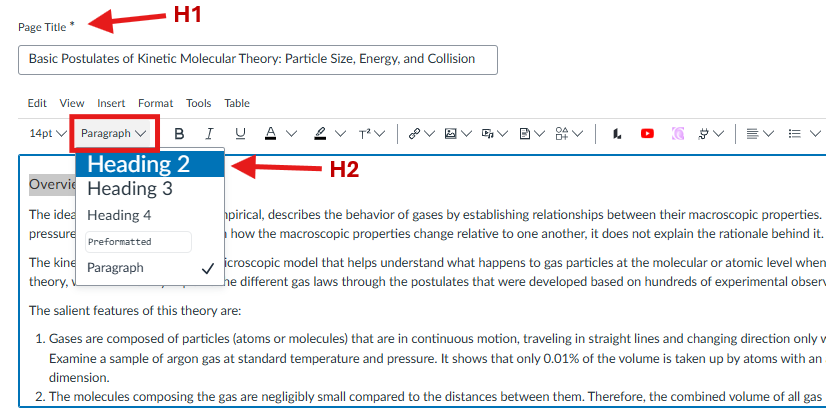
Heading 1 (H1) → Title of Page
Heading 2 (H2) → Main Topics
Heading 3 (H3) → Subtopics
Heading 4 (H4) → Sub-subtopics
Simple Tips for Using Headings:
- Canvas pages start with H2. Canvas provides the page title as H1, so use H2 for your first main topic on your page.
- Keep headings in order. Don’t skip heading levels ❌ H2 → H4
Instead, follow the hierarchy: ✅ H2→H3→H4 - Headings can move back up the hierarchy. For example: ✅ H2→H3→H2→H3→H4→H2
- Don’t use formatting to create a heading. Making text larger, bold, or a different color may make it look like a heading, but it doesn’t create the structure assistive technology needs.
- Keep it simple. Short sections and clear headings make content easier for everyone to scan and navigate.
Why it matters: Screen reader users can navigate from heading to heading, much like sighted users scan a page with their eyes. Clear, descriptive headings help students quickly find the information they need instead of having to listen to an entire page to locate one piece of content.
The 10-Second Test
 Ask yourself:If I looked only at the headings on this page, would I understand what the page is
about and how it is organized?
Ask yourself:If I looked only at the headings on this page, would I understand what the page is
about and how it is organized?
If YES → You're on the right track.
Your Canvas Fix This Week:
- Open your Canvas page and select Edit.
- Highlight the text you want to turn into a heading.
- Select Paragraph on the toolbar.
- Choose the appropriate Heading Level: H2 = Main Topic → H3 = Subtopic → H4 = Sub-subtopic
- Select Save when you’re finished.
Remember: Choose a heading based on its meaning and place in the content—not its appearance. You can always adjust the size or style without changing the heading level.
Lists
Use lists when you have:
- Multiple related items – such as supplies, resources, or examples.
- Steps or instructions – to show a sequence of actions.
- Key points or reminders – to highlight important information.
Choose the Right List
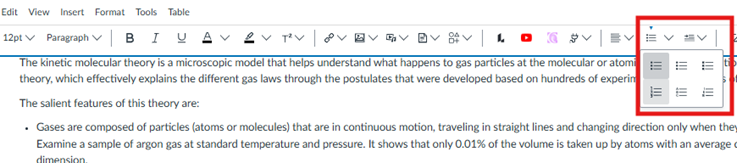
Use a Bullet List when the order of the items doesn’t matter.
Use a Numbered List when the items need to be completed in a specific order or sequence, such as cooking instructions or step-by-step directions.
Why it matters: Properly formatted lists provide structure that assistive technology can recognize. Screen readers can identify a list and communicate how many items it contains, helping students understand how the information is organized.
Your Canvas Fix:
- Open your Canvas page and select Edit.
- Place your cursor where you want the list to appear.
- Select the Bullet or Numbered List button and add your content. Look for the Blue Arrow above the list button to show the list feature is active.
- Press Enter to move to the next item.
- Press Enter twice to exit the list.
- Select Save when you’re done.
Remember: Always use the Canvas’s built-in list feature to create lists. Don’t type numbers or bullets manually.
tables
Tables can be a powerful learning tool when information needs to be organized, compared, or connected.
Simple Tips for Creating Tables:
- Use tables for information – not page layout. Tables should be used when information has a meaningful relationship between rows and columns.
- Use the built-in table feature. Create your table using Canvas’s table tool.
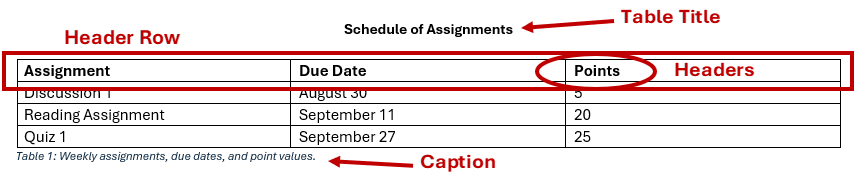
- Add clear headers. Identify what each row or column represents so students can understand the information.
- Keep tables simple. Avoid unnecessary rows, columns, and complicated layouts.
- Avoid merged or split cells. Complex tables can be difficult for students using screen readers to navigate.
- Keep your information concise. If a table becomes too large or contains lengthy paragraphs, consider whether another format would be easier for students to understand.
- Always add a caption to your table. Keep your caption short and descriptive. Give your students context to understand what the table contains.
- Want to add a title. If your table has a title, place it above the table rather than inside the table. The title does not need to be part of the table structure.
Example of an accessible table:
Why it matters: Properly structured tables help assistive technology understand the relationship between the information in each row and column. This allows students to navigate and make sense of the information more easily.
Your Canvas Fix:
- Open Canvas page and select Edit.
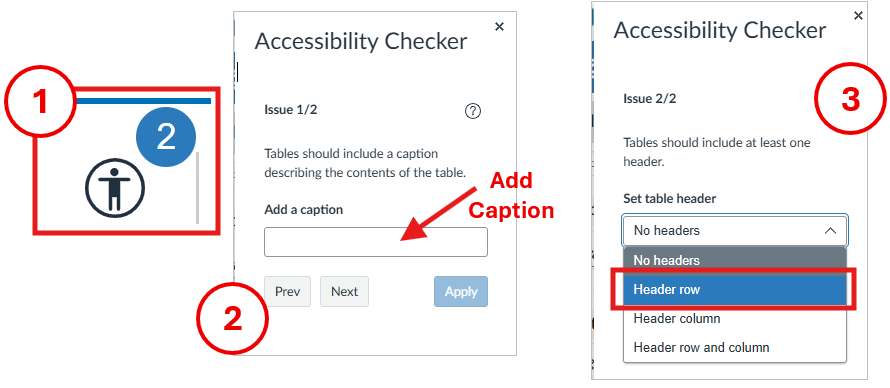
- Click on the Accessibility Checker icon.
- Add a Caption to describe what the table is about, then select apply.
- Select a Header Row, then click apply.
- Select Save when you’re finished.
The 10-Second Test
If I looked only at the headings on this page, would I understand what the page is
about and how it is organized?
If YES → you're on the right track.
Questions?
Need help making your Canvas content more accessible? Please feel free to reach out to the CTX Office or DE Coordinators.