UDOIT: Your Partner in Accessibility
Creating accessible course materials is an essential part of equitable teaching and learning. When our instructional content is accessible, we reduce barriers, improve usability, and create a more inclusive learning environment for all students.
Accessibility extends to everything we create as faculty, including Canvas pages, documents, presentations, images, videos, and other instructional resources. Because Canvas serves as the primary learning environment for most students, improving the accessibility of our Canvas courses is one of the most effective ways we can enhance the student experience.
One of the easiest ways to begin is by checking your UDOIT Accessibility Score. UDOIT scans your Canvas course, identifies common accessibility issues, and provides guidance for improving your content. Think of your UDOIT score as a starting point—not a finish line. It gives you a snapshot of where your course is today and helps you see where small changes can make a meaningful difference.
Since August, our college current average UDOIT score is rising due to your hardwork! Let's keep this momentum going as our goal is to increase our campus average to 90% by the end of Fall 2026 by making small, manageable improvements that have a significant impact on student success.
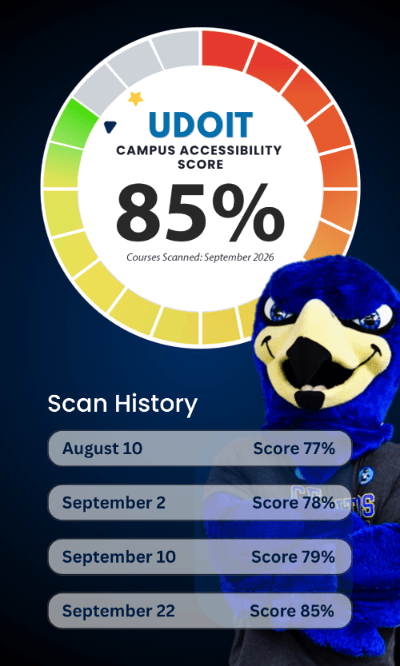
START Here → Know Your Number
The first step is simple: Run UDOIT in your Canvas courses.
But knowing your number does not mean you need to tackle everything at once. If your UDOIT report identifies a long list of accessibility issues, it can be tempting to feel overwhelmed. Accessibility is an ongoing practice, not a one-time task.
Start by knowing where you are. Then, take it one step at a time.
The DE Team and the CTX will guide you through weekly steps to learn the ACCESS principles together and explore practical ways to apply them to the content you already created. Each ACCESS Practice gives you another opportunity to make your course more usable, inclusive, and accessible.
You don't have to fix everything today. You just have to run UDOIT in your Canvas courses and know your number.